
01 Know your data before you touch a rule
☐ You can name the systems, owners and policy that apply to the rule you are about to tune.
Before tuning anything, answer three questions: what are you tuning, why, and for whom? A couple of examples:
- Do you know the systems that run in your organization? The same event means different things in different contexts - you cannot tell noise from signal without knowing who runs what, and why.
- What does your policy say? A tuning decision that contradicts a documented security policy is a security finding that is waiting to happen.
- What is the risk appetite? An example is excluding developers from a category of detection, which is a legitimate choice, if it is a choice, made deliberately and written down, not a side effect of someone silencing a noisy rule on a Friday afternoon.
EXAMPLE - AN ACCEPTED RISK THAT LOOKS LIKE AN ATTACK
Consumer VPN providers such as NordVPN, Mullvad and ExpressVPN are a textbook attacker indicator: sign-ins from their exit nodes trip anomalous-location, new-country and impossible-travel detections constantly. Some organisations nevertheless allow employees to use them, because the work requires it: researchers, consultants on client networks and staff travelling in countries where a corporate VPN is blocked.
That is a risk the company has chosen to accept. If you do not know that decision exists, you will spend weeks chasing “VPN attackers” who are your own colleagues or, worse, you will suppress the detection entirely and lose it for the cases where it was an attacker. Knowing the decision lets you tune precisely: close sign-ins from the approved provider ranges for known users on managed devices and keep everything else.
| System / behaviour | Owner | Expected | Policy reference | Risk decision |
|---|---|---|---|---|
| Consumer VPN (NordVPN, Mullvad, ExpressVPN) | CISO | Allowed for all staff on managed devices | AUP §4.2 | Accepted 2026-03 - review yearly |
| KeyVault-spn-billing-prod-001 | Platform team | Nightly secret rotation 01:00-02:00 from prod subnet | CHG-2210 | Exclude only in that window + subnet |
| Azure DevOps service connections | DevOps lead | Deploys weekdays, prod subscription only | Release process | Alert on weekend / non-prod use |
Tuning without this context is just noise reduction. With it, it is security engineering.
02 Always baseline before you tune
☐ The rule has at least 30 days of history, and you have queried what its incidents have in common.
Query the alert history back and look for what the alerts have in common. What are they triggering on? Is there a repeating pattern you can match against, like entities or a specific Extended Properties field?
Give a rule at least 30 days of running time before drawing conclusions. Less than that and you are tuning against a sample, not a baseline, and you will exclude something you potentially needed.
STEP 1 - THE ENTITY SET BEHIND EVERY ALERT
let AlertSets =
SecurityAlert
| where TimeGenerated > ago(30d)
| where AlertName =~ @"User login from different countries within 3 hours (Uses Authentication Normalization)"
| extend Entities = parse_json(Entities)
| mv-expand Entities
| extend Entity = strcat(
tostring(Entities.Type), ":",
tostring(coalesce(Entities.Name, Entities.Address, Entities.HostName)))
| summarize EntitySet = make_set(Entity) by SystemAlertId, AlertName, TimeGenerated;

AlertSets
| order by TimeGenerated desc
STEP 2 - COMPARE EVERY ALERT AGAINST EVERY OTHER ALERT
One alert tells you what fired. Two alerts side by side tell you whether it is the same thing firing again. Cross-join the entity sets and score each pair on how much they overlap: a high similarity between alerts days apart is a recurring pattern, and a recurring pattern is a tuning candidate.
AlertSets
| project AlertA = tostring(SystemAlertId), TimeA = TimeGenerated, SetA = EntitySet
| extend JoinKey = 1
| join kind=inner (
AlertSets
| project AlertB = tostring(SystemAlertId), TimeB = TimeGenerated, SetB = EntitySet
| extend JoinKey = 1
) on JoinKey
| where strcmp(AlertA, AlertB) < 0 // keep each pair once
| extend
Common = set_intersect(SetA, SetB),
OnlyAlertA = set_difference(SetA, SetB),
OnlyAlertB = set_difference(SetB, SetA),
Union = set_union(SetA, SetB)
| extend CommonCount = array_length(Common), UnionCount = array_length(Union)
| extend SimilarityPct = iff(UnionCount == 0, 0.0, round(100.0 * CommonCount / UnionCount, 1))
| project TimeA, AlertA, TimeB, AlertB, SimilarityPct, CommonCount, Common, OnlyAlertA, OnlyAlertB
| order by SimilarityPct desc
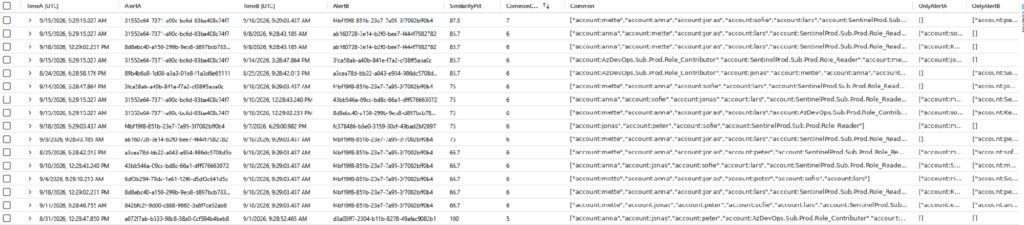
Pairwise similarity for one rule over 30 days. Alerts three days apart share 87.5% of their entities - the same five users and one role identity, every time. That set is the tuning target.
03 Take the highest-volume alerts first
☐You have a ranked list of rules by incident count and false-positive rate, and you start at the top.
This is where you gain the most value. Alert volume in Sentinel follows a steep curve: a handful of rules typically generate most of your incidents, and a large amount of those are false positives. High volume and high false-positive rate tend to travel together: the rules that fire constantly are usually the ones matching too broadly.
Sort your alerts over the last 30 days and work top-down. Fixing the top five noisiest rules will almost always beat fixing the next fifty, for a fraction of the effort.
HOW TO CHECK - NOISIEST RULES AND THEIR FP RATE
SecurityIncident
| where TimeGenerated > ago(30d)
| summarize arg_max(TimeGenerated, *) by IncidentNumber
| summarize Total = count(),
FP = countif(Classification in ("FalsePositive", "BenignPositive")),
TP = countif(Classification == "TruePositive"),
NotClassified = countif(isempty(Classification))
by Title
| extend FPRate = round(FP * 100.0 / Total, 1)
| where Total > 10
| order by Total desc
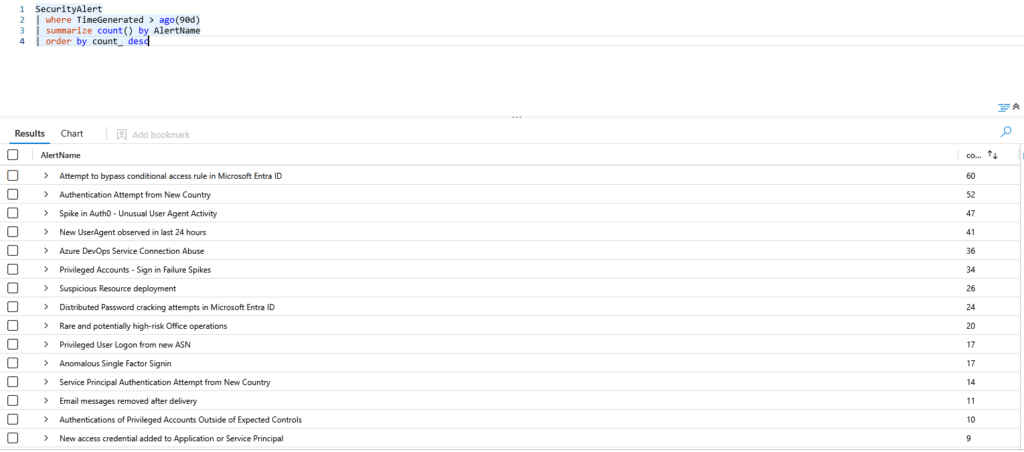
Alert count by rule, noisiest first. A handful of rules carry most of the volume. Start at the top.
It also buys you analyst goodwill early, which matters more than it should. The team sees the queue shrink within a week, and tuning stops being something you only talk about.
04 Prefer Logic Apps over automation rules
☐Any closure logic beyond trivial tagging runs as a playbook with a run history you can open.
Automation rules are quick, but you get more control from Logic Apps and, more importantly, a far better audit trail.
When an automation rule fails, working out why it failed is cumbersome: the full visibility simply is not there. A Logic App gives you run history and per step inputs and outputs. For anything beyond trivial tasks like incident tagging, build it as a playbook.
PROBLEM 1 - YOU CANNOT SEE WHAT THE CONDITION IS MATCHING
An automation rule condition on Account name looks precise. But the entity the rule receives may be a display name, a UPN, or an object id, depending on which analytics rule and connector produced it. The condition builder gives you no way to inspect that before it runs you are matching a string against a value you have never seen.
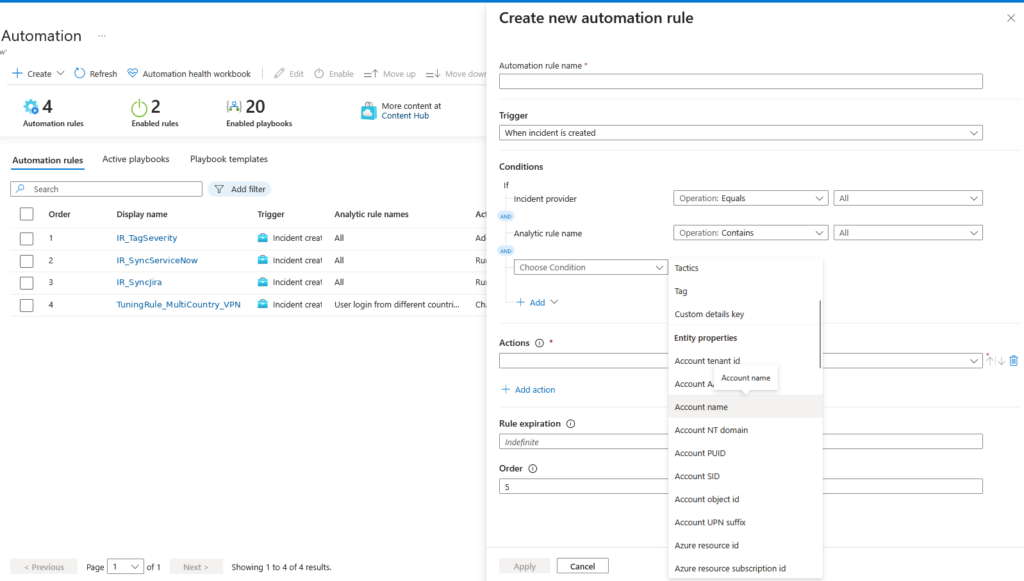
Automation rule condition on Account name. Whether that field holds first part of the UPN short name, a UPN or a GUID depends entirely on the source rule - and nothing here tells you which.
PROBLEM 2 - THE AUDIT TRAIL ONLY SAYS IT RAN
SentinelHealth records that the rule executed and how many actions fired. It does not record which condition matched, what the entity values were, or why an incident was or was not closed. When a real incident is auto-closed by mistake, this is all you have.
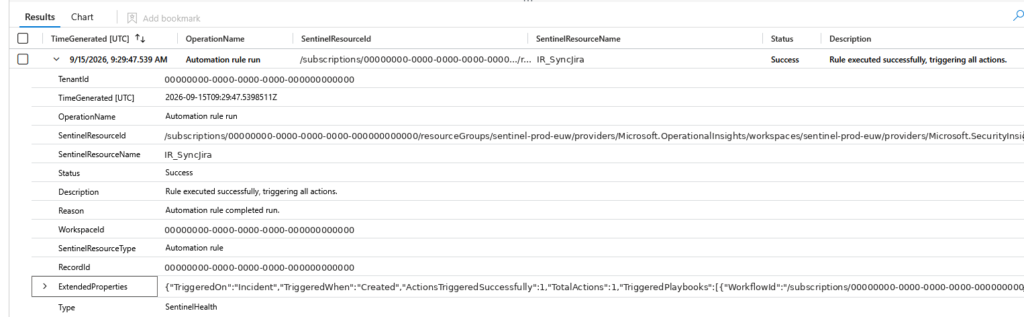
SentinelHealth for an automation rule run: status, action count, workflow id. No conditions, no entity values, no reasoning.
WHAT A LOGIC APP GIVES YOU INSTEAD
A playbook can run KQL against the incident, parse the entities, detect whether an account came through as a GUID, and resolve it against IdentityInfo or SigninLogs before deciding anything. Every step records its full input and output, so a closure decision can be reconstructed months later.
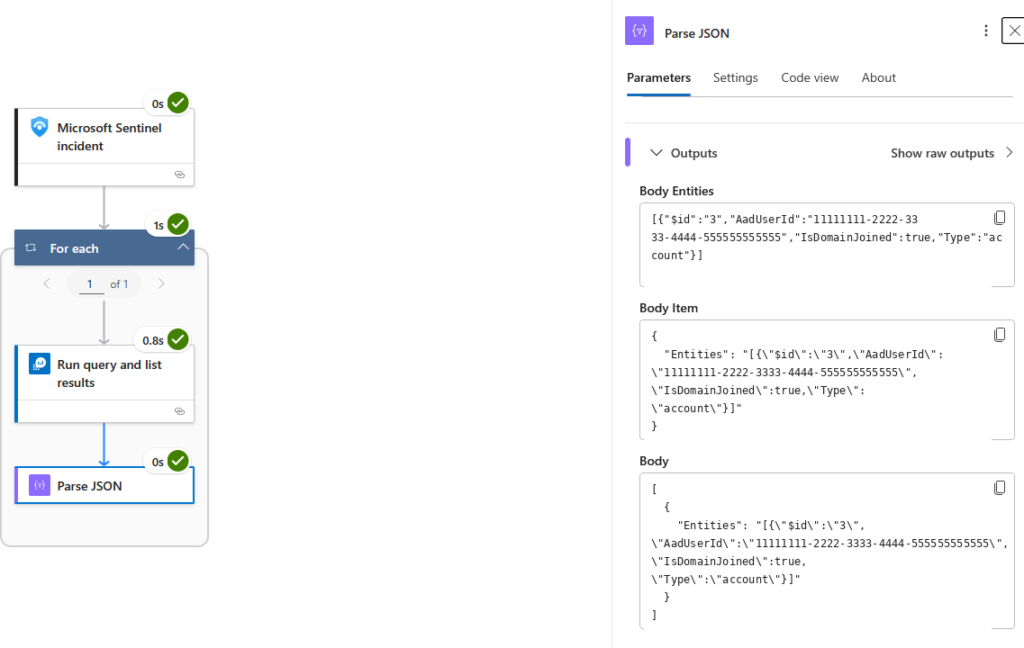
The same incident in a Logic App: Sentinel trigger → run KQL → parse entities. The AadUserId came through as a GUID, visible in the step output - the next action resolves it to a user.
EXAMPLE - RESOLVING A GUID ENTITY BEFORE CLOSING
let accounts = dynamic([“11111111-2222-3333-4444-555555555555”, “anna”]);
IdentityInfo
| where TimeGenerated > ago(14d)
| where AccountObjectId in (accounts) or AccountUPN in (accounts) or AccountName in (accounts)
| summarize arg_max(TimeGenerated, *) by AccountObjectId
| project AccountObjectId, AccountUPN, AccountDisplayName, Department, IsAccountEnabled
| Automation rule | Logic App playbook | |
|---|---|---|
| Conditions | Fixed condition builder | Any logic, any data source |
| Enrichment before closing | No | Yes (IdentityInfo, SigninLogs, TI, watchlists) |
| Entity resolution (GUID → user) | No | Yes |
| Audit trail | SentinelHealth: ran / failed, action count | Full run history, per-action input and output |
| Debugging a failure | Hard | Open the run, see the step |
| Best for orchestration | Tagging, assignment, ordering, running playbooks | Closure decisions, enrichment |
05 Always exclude on multiple factors at once
☐ Every exclusion combines 3-5 conditions - never a single account, IP or host on its own.
This is the single most common tuning mistake: excluding one attribute in isolation.
You cannot safely exclude an account from an alert on its own: what happens when that account triggers in a completely different context? Say you exclude a user from identity protection or unfamiliar sign-in properties alerts. Add the device they are using, the country, the application, the time window as many factors as make sense.
The more factors, the safer the exclusion. The limit is comprehensibility: an exclusion so complicated that nobody can read it has traded one problem for another. Aim for three to five meaningful conditions.
EXAMPLE - MATCHING ON ENTITIES, NOT ON ONE FIELD
The match happens on the incident’s entities, inside the playbook: the account entity must equal the approved account, and an IP entity must fall inside the approved subnet. Both, or nothing is closed. Adding a device, a country or a time window is one more line in the same query. The general rule is: The more conditions the better.
let TargetAccount = “user@contoso.com”;
let TargetSubnet = “10.20.30.0/24”;
SecurityAlert
| where SystemAlertId == “<Alert System ID from the trigger>”
| extend Entities = parse_json(Entities)
| mv-expand Entity = Entities
| extend EntityType = tostring(Entity.Type),
AccountName = tostring(Entity.Name),
IPAddress = tostring(Entity.Address)
| summarize
AccountMatch = countif(EntityType == “account” and AccountName =~ TargetAccount),
IPMatch = countif(EntityType == “ip” and ipv4_is_in_range(IPAddress, TargetSubnet))
by SystemAlertId, TimeGenerated, AlertName
| where AccountMatch > 0 and IPMatch > 0
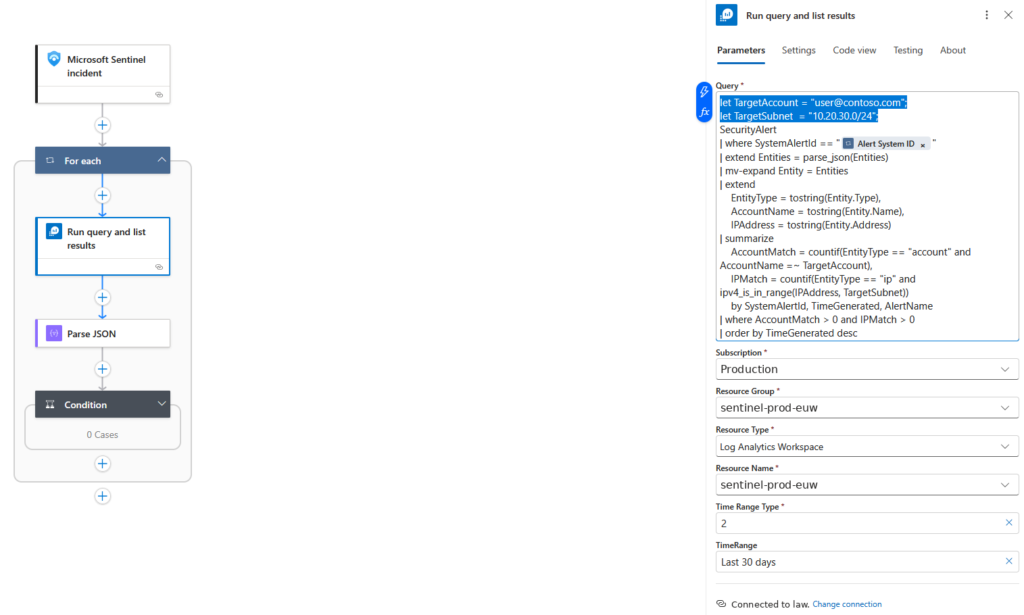
The same query as a Logic App step. The Alert System ID comes from the trigger; the account and subnet come from parameters (or a watchlist). Two factors must match before the Condition step is allowed to close anything.
06 Build rules you do not have to maintain
☐ For each rule you can answer: what must change in this environment for it to silently stop working?
A tuning rule that needs monthly attention is a liability. Prefer broad detection rules that look for genuine behavioural patterns over narrow rules that look at very specific scenarios.
For every rule you write, ask yourself: what must change in this environment for this to silently stop working?
ANTI-PATTERN - AS FOUND IN THE WILD
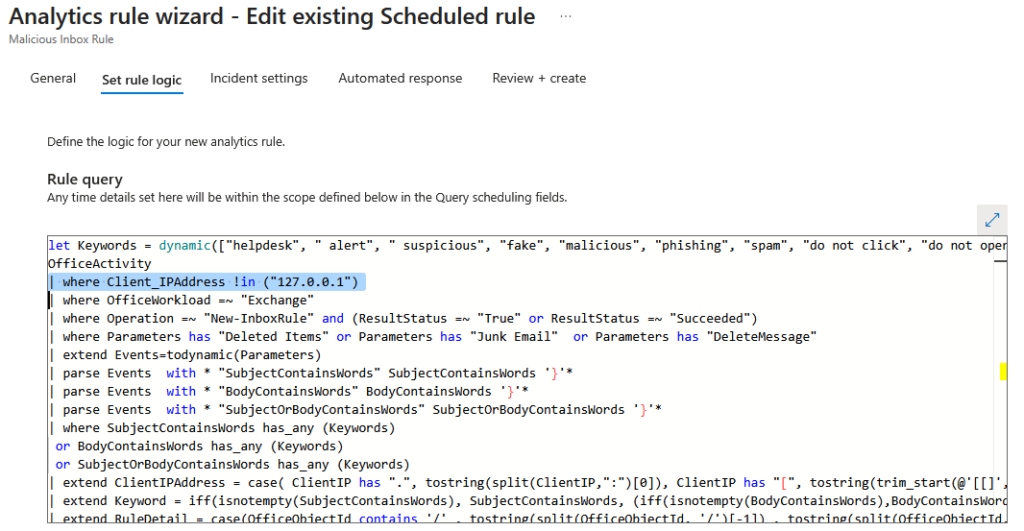
A hardcoded IP exclusion at the top of a production rule query. It works today, and it is exactly the kind of rule you will have to maintain.
This is the maintenance trap in one line. The exclusion has no owner, no reason, no expiry, and it lives inside the detection logic, so the next person to edit the rule either does not notice it or does not dare remove it. Multiply by forty rules and three years of authors and you have a workspace nobody can reason about. Put the value in a watchlist (item 10) and reference it; the rule stays clean and the exclusion becomes data you can review.
07 Keep standards: naming, structure, method
☐Rules, exclusions, watchlists and playbooks follow one written naming convention.
Use a consistent naming convention for rules, exclusions, watchlists and playbooks, and a consistent way of implementing each.
The test is simple: can the next SOC analyst look at your workspace and see what has been done, and why, without asking you? If the answer is no, the tuning belongs to you personally rather than to the organisation and it will decay the moment you move on.
CONVENTION
Two rule families, named by what they do, and the incident tagged with the exact rule name, so the audit trail reads end to end: analytics rule → automation/playbook → tag → closure comment.
| Family | Pattern | Examples |
|---|---|---|
| Tuning rule | TuningRule_<Scenario>_<Context> | TuningRule_MultiCountryLogin_VPNUsers TuningRule_BruteForce_KeyVaultSPN TuningRule_NewUserAgent_DevOpsPipeline |
| Investigation rule | InvestigationRule_<Scenario> | InvestigationRule_ImpossibleTravel InvestigationRule_CAPolicyBypass InvestigationRule_SPNNewCountry |
| Watchlist | WL_<Family>_<Scope> | WL_Tuning_VPNProviderRanges WL_Tuning_ServiceAccounts |
| Playbook | PB_<Family>_<Scenario> | PB_Tuning_MultiCountryLogin |
| Incident tag | Same string as the rule that acted | TuningRule_MultiCountryLogin_VPNUsers |
WHAT THE AUDIT TRAIL THEN LOOKS LIKE
| Where | What you see |
|---|---|
| Analytics rule | User login from different countries within 3 hours |
| Playbook run | PB_Tuning_MultiCountryLogin - matched WL_Tuning_VPNProviderRanges, user anna on managed device |
| Incident tag | TuningRule_MultiCountryLogin_VPNUsers |
| Closure | BenignPositive - SuspiciousButExpected. Comment: “Approved consumer VPN (Mullvad), managed device, see AUP §4.2” |
Searching SecurityIncident for the tag returns every incident that rule ever closed - one query, full history, no guessing.
08 Re-validate with simulation, not history
☐ After every change, the rule was simulated and a true-positive test case still fires.
After changing a rule, test it. Historical data only proves you removed noise; it does not prove the detection still fires on the thing it exists to catch. Use the analytics rule wizard’s results simulation and run relevant test cases against the logic, to make sure it is working as intended.
HOW TO CHECK - REPLAY THE RULE, THEN READ THE PLAYBOOK RUN
Analytics → select the rule → Rule runs (Preview) lets you replay a historical run of a scheduled rule. Replay one that should match your tuning, then open the playbook’s run history and read the actual inputs and outputs: did the match resolve the way you expected, and did the Condition step take the branch you intended? If the run does not look like what you predicted, the tuning is wrong - regardless of how good the KQL looked.
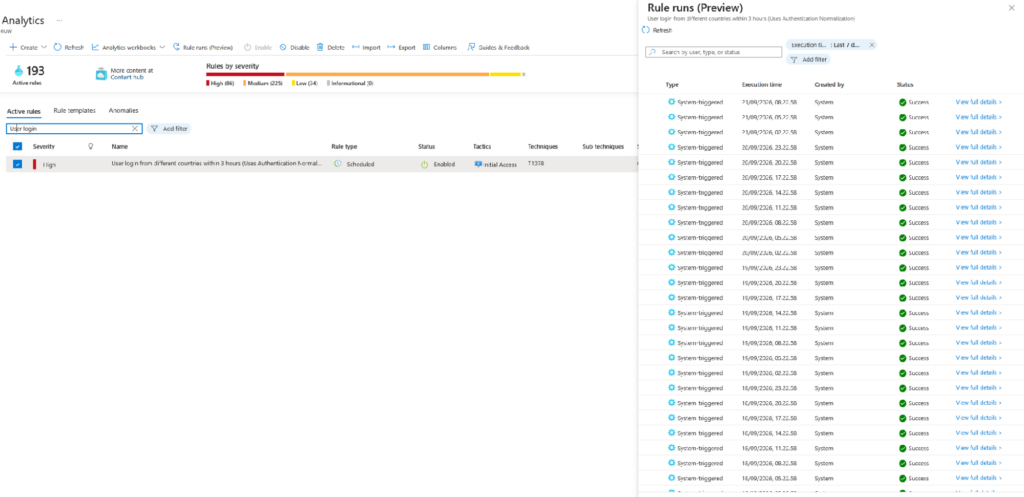
Rule runs (preview) for a scheduled analytics rule. Pick a run, replay run, and watch what the automation does with it.
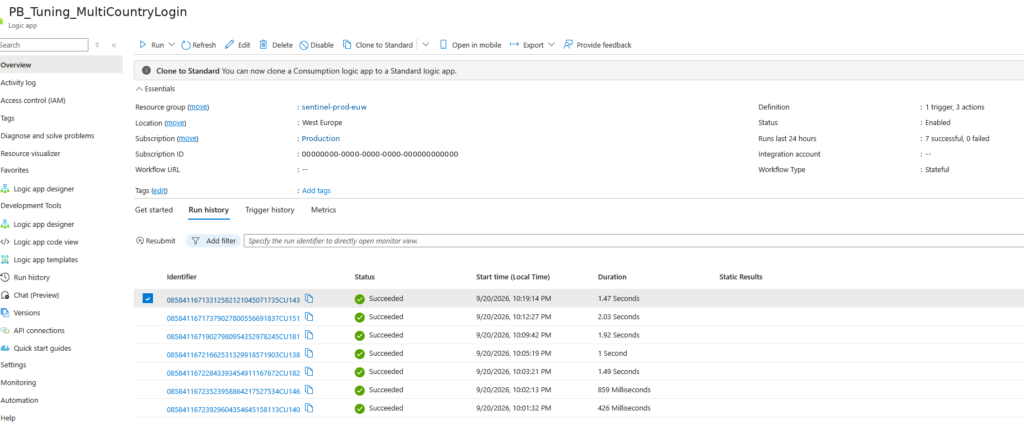
The playbook’s run history after the replay. Open the run to see every step’s input and output, not just Succeeded.
If the alert does not come from an analytics rule (a Defender or Entra ID Protection alert, for instance), there is nothing to replay. You then must trigger the real alert in a controlled way (a test account, an attack simulation) or simulate what the playbook would receive and run it against that. Either way: do not ship closure logic that has never been observed closing the right thing.
| Alert source | How to re-validate |
|---|---|
| Scheduled / NRT analytics rule | Rule runs → Replay run → inspect playbook run |
| Defender XDR / Entra alert | Trigger with a test identity or simulation; inspect playbook run |
| Anything with a playbook | Resubmit a past run against a known-good and a known-bad incident |
09 Prefer tuning over suppression
☐Known-benign incidents are auto-closed with a classification, not suppressed at the rule.
Suppressing an alert removes it from view entirely. Closing an incident with a classification keeps it visible, countable, and auditable.
Default to closure. You keep the signal, you keep the metrics, and you can sample closed incidents to verify your tuning is still correct. Suppression should be reserved for cases where you genuinely never want to see the event.
| Suppression | Auto-close with classification | |
|---|---|---|
| Visible in incident queue | No | Yes (closed) |
| Counts toward metrics / FP rate | No | Yes |
| Auditable decision | No | Yes - classification + comment |
| Usable in incident reconstruction | No | Yes |
| Sampling to verify tuning | Impossible | Pull 20 closed incidents a week |
This pays off during an incident: closed incidents remain part of your history, so you can look back at what fired weeks ago and reconstruct how an attack was executed. Suppressed alerts leave you nothing to look back at.
10 Keep exclusions in a watchlist
☐ Every exclusion list lives within a watchlist with Owner, Reason and ExpiryDate columns - not inline in KQL.
If you have users, IP ranges, devices or service accounts that should be excluded, keep them in one structured place: a watchlist, referenced from rule logic via _GetWatchlist().
The alternative is the state most workspaces are in: exclusions scattered across multiple analytics rules, added by multiple people over several years, each in a slightly different style. That is unmaintainable, and it makes a complete overview effectively impossible. Nobody can answer, “what are we currently blind to?” because the answer is spread across forty KQL queries.
EXAMPLE
let excl = _GetWatchlist(‘WL_Tuning_ServiceAccounts’)
| where ExpiryDate > now()
| project UserPrincipalName, IPRange;
SigninLogs
| where ResultType == “0”
| join kind=leftanti (excl) on UserPrincipalName
| …
| UserPrincipalName | IPRange | Owner | Reason | ExpiryDate |
|---|---|---|---|---|
| KeyVault-spn-billing-prod-001 | 10.20.30.0/24 | Platform team | Nightly secret rotation, CHG-2210 | 2027-03-31 |
| anna@contoso.com | WL_Tuning_VPNProviderRanges | CISO | Approved consumer VPN, AUP §4.2 | 2027-03-01 |
A watchlist turns exclusions into reviewable and reusable data.
11 Document why
☐ Every tuning change has a record: what, why, who approved, review date, ticket.
For every tuning change, record the rationale: what was excluded, why, who approved it, and when it should be reviewed.
This is the part teams skip and regret. Documented tuning becomes SOC knowledge: you can return in a year and reconstruct the reasoning instead of guessing whether it is still valid.
| Field | Example entry |
|---|---|
| Rule / tag | TuningRule_MultiCountryLogin_VPNUsers |
| Change | Auto-close when source IP is in WL_Tuning_VPNProviderRanges AND device is compliant AND user in WL_Tuning_VPNUsers |
| Rationale | Consumer VPN use approved under AUP §4.2; 131 incidents for one user in 30 days, 0 TP |
| Risk accepted by | CISO, 2026-03-14 |
| Review date | 2027-03-01 (watchlist expiry) |
| Ticket / PR | CHG-3390 · sentinel-content #204 |
12 Review tuning on an ongoing basis
☐ A recurring review is in the calendar, and rules that never fire have a defined lifecycle.
Tuning is not a project. Rules go obsolete, environments change, and risk appetite shifts: a decision made under a lower risk appetite two years ago may be indefensible now.
A rule that no longer produces any incidents because everything is auto-closed is not the best possible outcome - and it looks identical to success on a dashboard.
| Cadence | Review |
|---|---|
| Weekly | Top 10 noisiest rules; sample 20 auto-closed incidents by hand |
| Monthly | Rules with zero incidents in 30 days: broken, or candidate for hunting/retirement |
| Quarterly | Full exclusion and watchlist review; expired entries removed; risk decisions re-confirmed |
| On change | Any connector, schema or policy change triggers re-validation (item 8) |
HOW TO CHECK - RULES THAT HAVE GONE SILENT
let fired = SecurityIncident
| where TimeGenerated > ago(30d)
| distinct Title;
// compare against your enabled rules (export via API / repo)
// any enabled rule not in ‘fired’ needs a decision: fix, hunt, or retire
ONE-PAGE SUMMARY
The checklist
| # | Check | When |
|---|---|---|
| 1 | Systems, owners, policy and risk appetite known for the rule | Before tuning |
| 2 | ≥ 30 days of history; common entities/properties identified | Before tuning |
| 3 | Rules ranked by volume and FP rate; working from the top | Before tuning |
| 4 | Closure logic runs as a Logic App with run history | Per change |
| 5 | Exclusions combine 3-5 factors | Per change |
| 6 | Rule survives environment change without silent failure | Per change |
| 7 | Naming convention applied to rule, watchlist, playbook | Per change |
| 8 | Simulated; TP test case still fires | Per change |
| 9 | Auto-closed with classification, not suppressed | Per change |
| 10 | Exclusions in a watchlist with owner, reason, expiry | Per change |
| 11 | Tuning record written (what, why, who, review date, ticket) | Per change |
| 12 | Weekly / monthly / quarterly review scheduled | Ongoing |
The pattern across all twelve: every one of them is about making tuning maintainable, because manual tuning does not fail on day one; it fails at scale, quietly, eighteen months in.
Weighing hand-written rules against automated tuning? Read Eliminating Sentinel alert fatigue: automated tuning vs. manual rules. Choosing which AI belongs in your triage layer? Read Agentic AI for the SOC.
Automate your tuning. Checks 2, 3 and 12 are continuous work, not a one-off project. Seculyze Tune applies AI-driven alert noise reduction on top of your existing Sentinel, while your team keeps control of every closure decision.
 Microsoft Sentinel Multi-Tenant Management: A Tuning Guide for MSSPs
Not fifty. Five. That is how many workspaces Microsoft recommends you put in a single cross-workspace query before performance degrades. Read article
Microsoft Sentinel Multi-Tenant Management: A Tuning Guide for MSSPs
Not fifty. Five. That is how many workspaces Microsoft recommends you put in a single cross-workspace query before performance degrades. Read article
 Eliminating Sentinel Alert Fatigue: Automated Tuning vs. Manual Rules
Closing a false positive today is easy. Keeping it closed, correctly, for the next eighteen months is the real job. Read article
Eliminating Sentinel Alert Fatigue: Automated Tuning vs. Manual Rules
Closing a false positive today is easy. Keeping it closed, correctly, for the next eighteen months is the real job. Read article